Your first plan
Start with a purpose.
Choose a personal starting plan for your situation. Set aside an affordable amount before you decide how to invest.
 Beep Personal FinanceThe Tech Idea / فكره تك
Everyday spending. Plans for tomorrow. A place for your investments. Bring it all together in a simple planner that lives on your phone.
Free app · No app account · English & Arabic
To update, install the new version over the existing app without uninstalling it. Save a backup outside the app first; uninstalling can erase its local records.


A LOOK AT WHAT YOU CAN DO
From today’s spending to tomorrow’s possibilities. Take a closer look at the tools already in the app.
Actual app screens · Fictional example dataYour first plan
Choose a personal starting plan for your situation. Set aside an affordable amount before you decide how to invest.
Your month
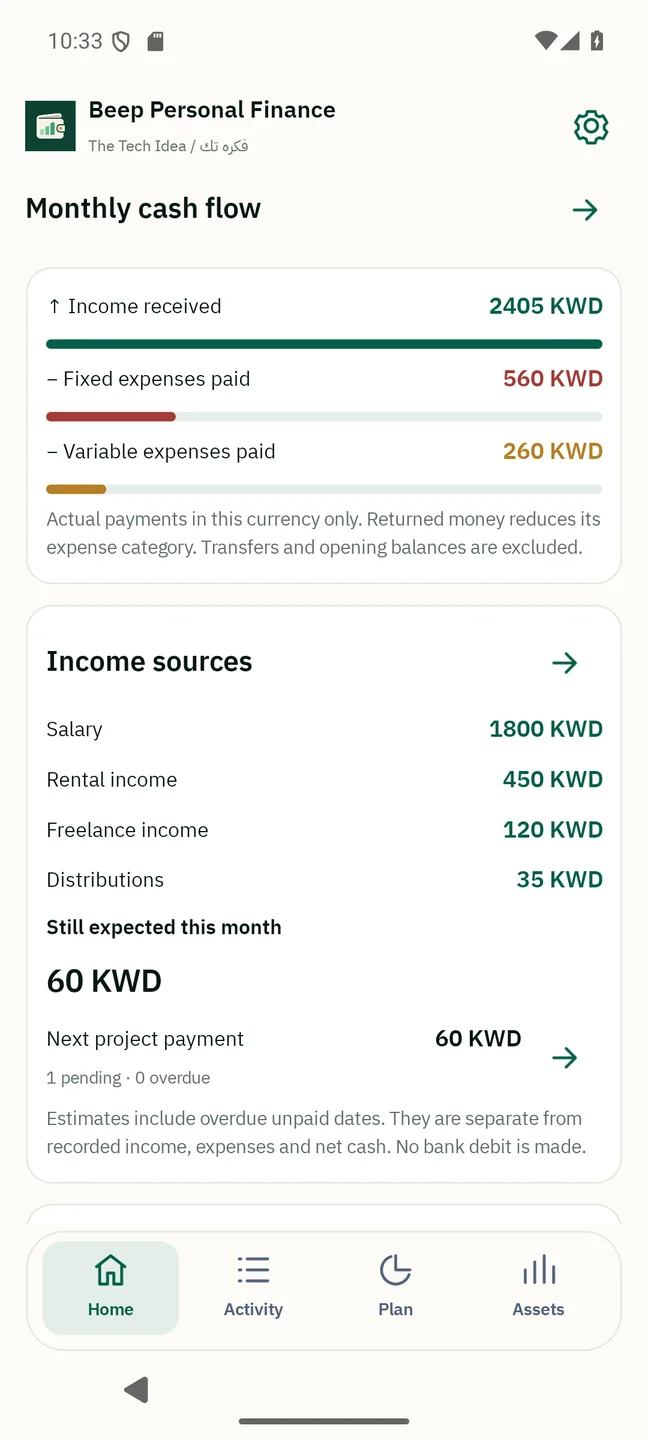
Salary, rental income and other receipts. Fixed commitments and everyday spending, clearly separated.
Monthly budget
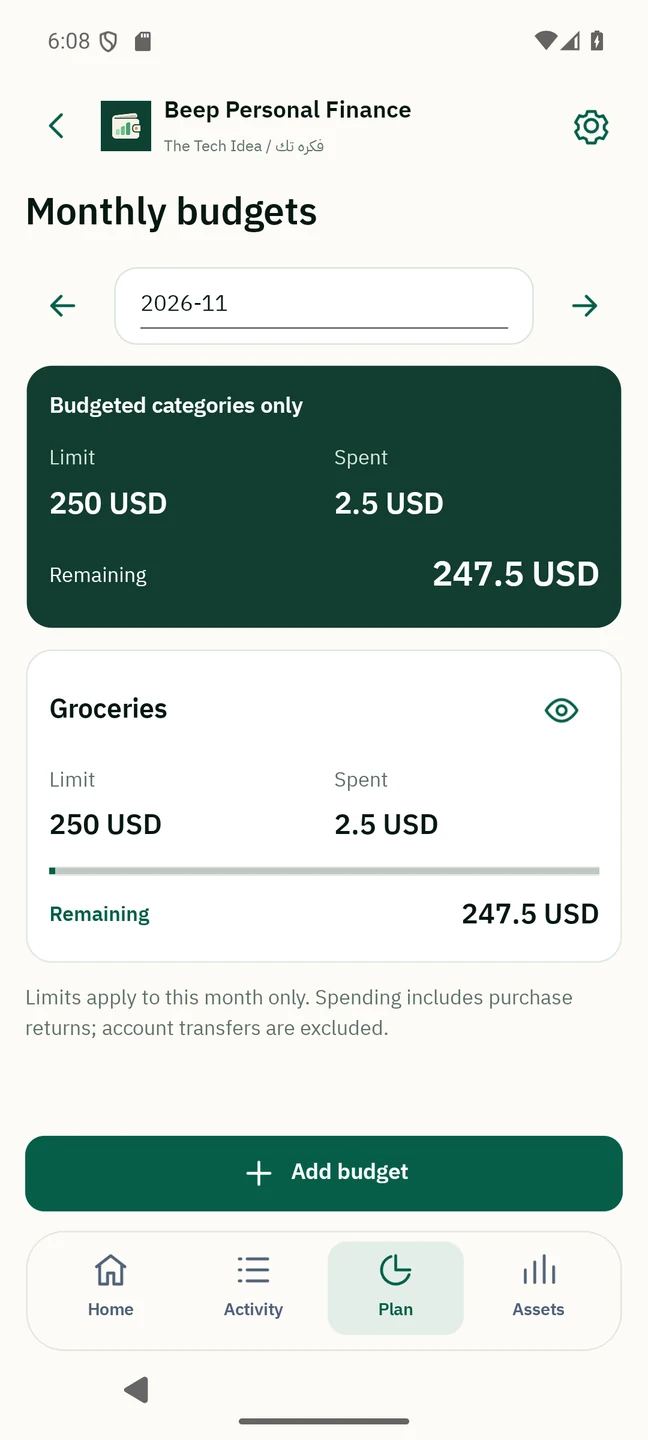
Set a limit for each category and see what you have spent and what remains.
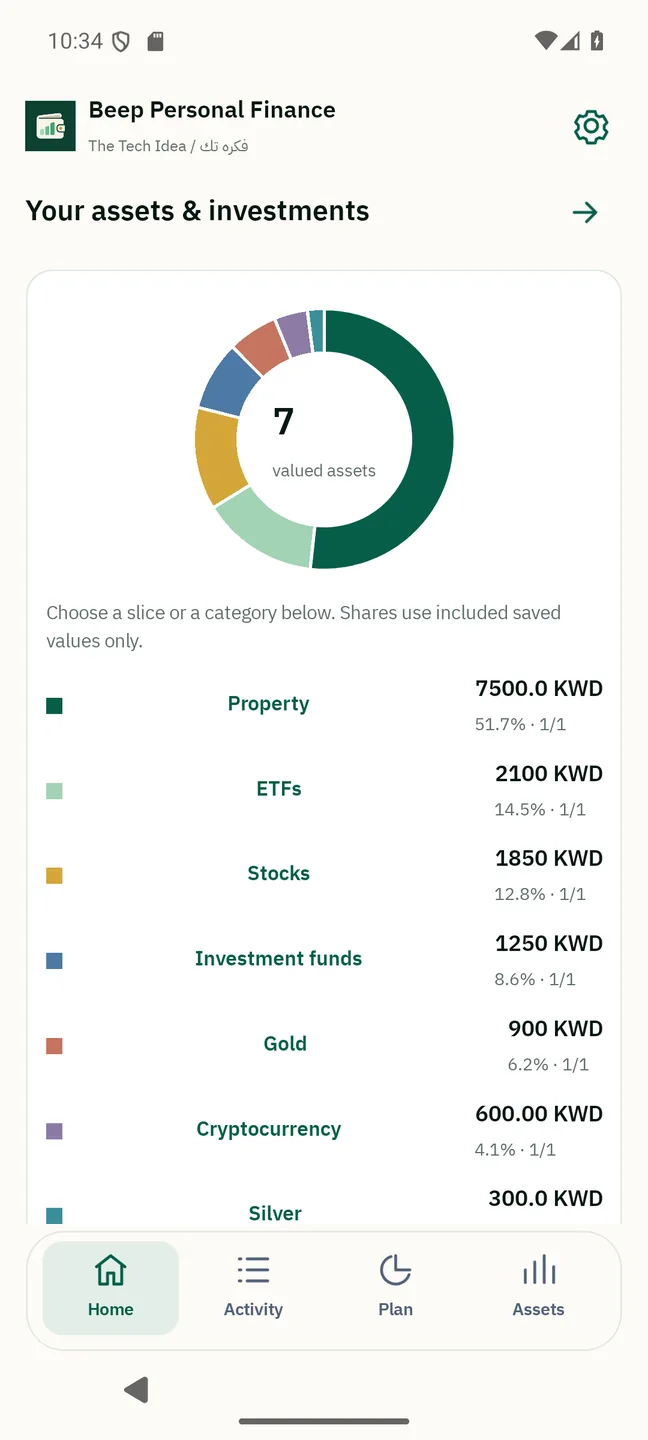
Asset mix
Stocks, ETFs, funds, gold, silver, property and crypto. Explore your mix using saved, dated estimates.
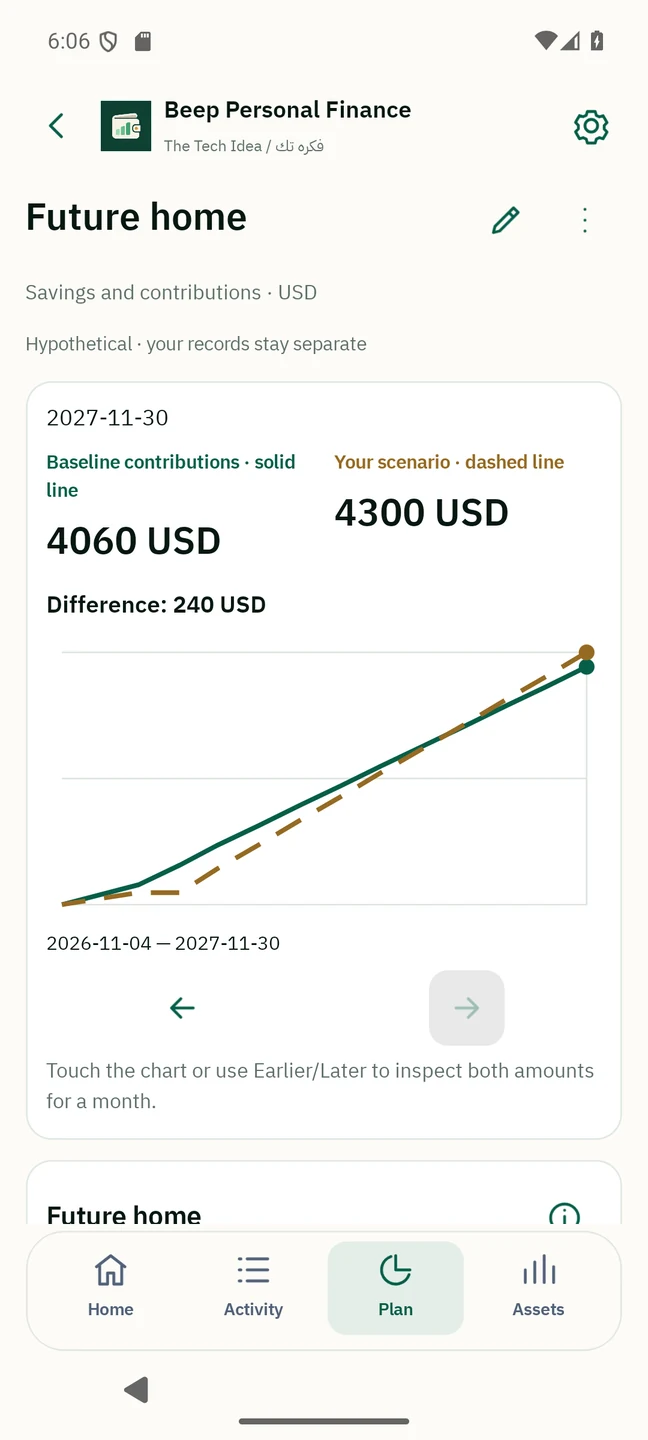
What if?
Try a different income, expense or contribution. Compare possibilities without changing your actual records.
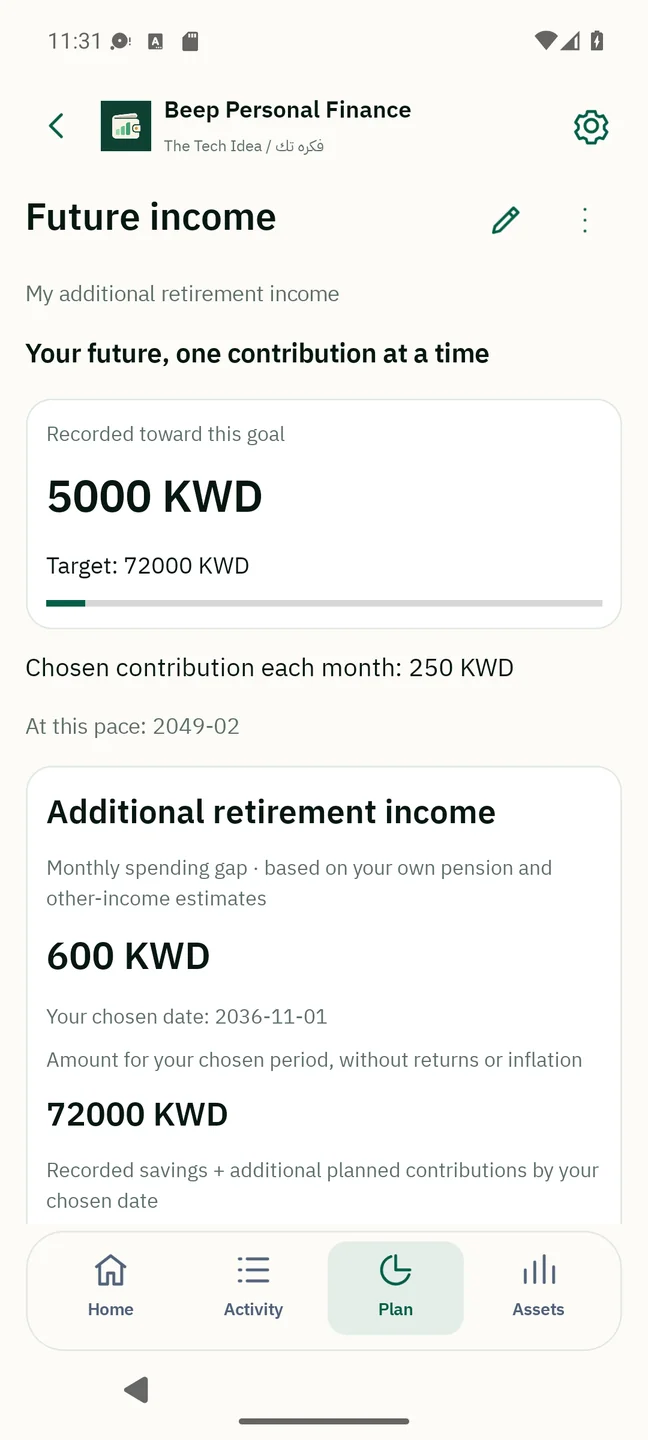
Future income
Explore additional retirement income alongside your own pension estimate, with contribution-only illustrations and no assumed returns.
YOUR FIRST FEW MINUTES
You choose what to add. Start with one account and one expense; build the rest at your own pace.
Start with English or Arabic, then a short introduction to giving your money a purpose. You can skip it and change language later.
Search for your country and currency. They are independent choices, with flags to help you find them.
Choose an optional life-stage plan, review your income and future contribution, then add your account. You can skip the guide and return later.
Create a dated backup and copy it to Files or supported connected storage. Keep a copy outside the phone.
Backup guidanceSTEP INSIDE
Choose a screen to follow a real journey through the Android app.
Actual app captures · Fictional example dataIN THE APP · 01 / 12
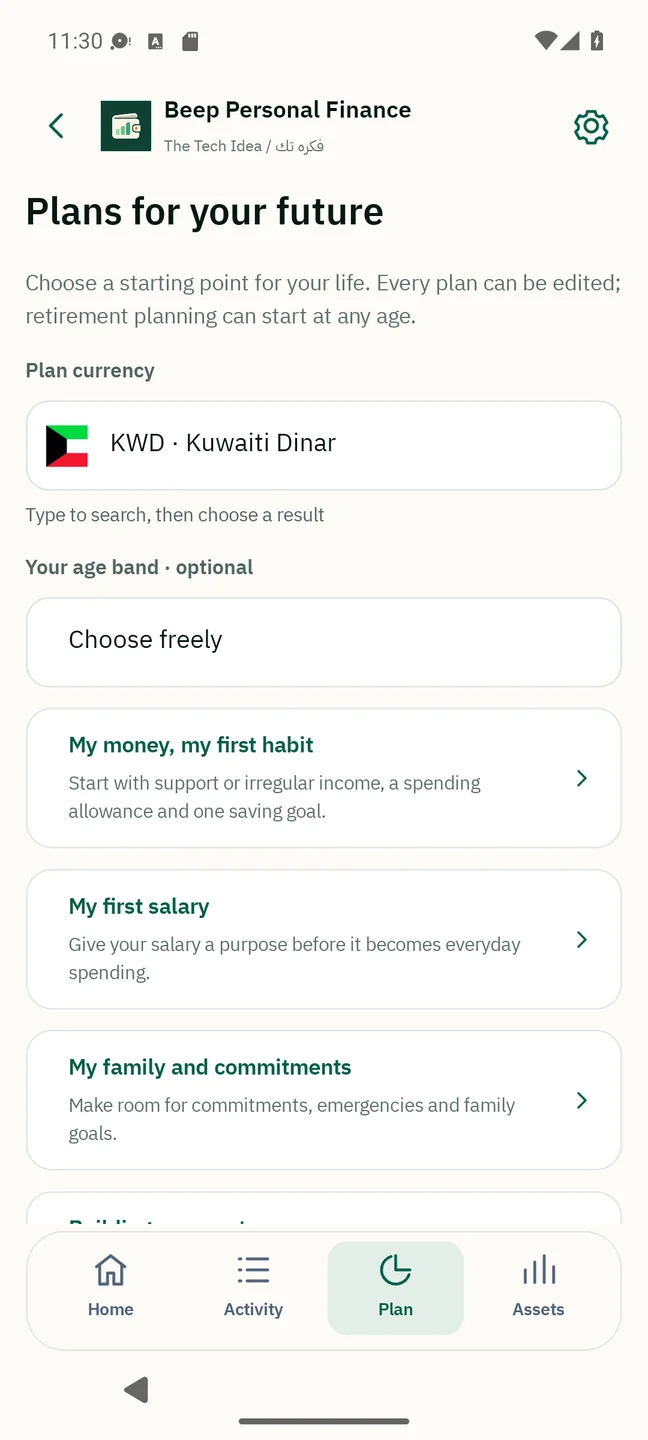
After language and local preferences, explore five editable starting points: a first saving habit, first salary, family commitments, building assets and additional retirement income.
Educational templates, not age-based investment prescriptions. No bank debit or automatic investment.
Try it on your phoneIN THE APP · 02 / 12
Choose a date, contribution and desired spending. Add your own pension estimate if known; keep an unknown pension visible as unknown.
No statutory pension calculation, assumed returns, inflation adjustment or guaranteed lifetime income. These are your editable estimates.
Try it on your phone
IN THE APP · 03 / 12
Explore the saved asset chart, then set optional percentages for the types you want to track.
Partial values are labelled. The target does not buy, sell, rebalance or certify Sharia compliance; diversification cannot guarantee profit.
Try it on your phoneIN THE APP · 04 / 12
See your recorded monthly net cash and saved asset estimates, then explore income, fixed expenses, variable expenses and your portfolio.
Balances are your recorded figures; the app does not connect to your bank.
Try it on your phoneIN THE APP · 05 / 12
Follow salary, rental receipts and other income alongside fixed and variable expenses, with budget progress.
Expected amounts do not change balances. No automatic bank debit is made.
Try it on your phoneIN THE APP · 06 / 12
Explore stocks, ETFs, funds, gold, silver, property and cryptocurrency by category.
Dated estimates, not guaranteed live prices. Physical metals and cryptocurrency can be priced manually. Rental receipts remain separate from property value.
Try it on your phone
IN THE APP · 07 / 12
Explore a portfolio dashboard with allocation, recorded values and clear personal holdings.
Provider coverage, delays and fees depend on the selected service and plan.
Try it on your phone
IN THE APP · 08 / 12
Inspect saved price points and your holding’s value in an interactive native chart.
The chart uses saved price history. It is not a guaranteed live market chart.
Try it on your phoneIN THE APP · 09 / 12
Compare possibilities for spending, income, commitments, savings, investments and property.
Hypothetical illustrations only. Scenarios do not change balances, prices or actual plans, and assume no interest.
Try it on your phone
IN THE APP · 10 / 12
Compare saved asset values with a one-time hypothetical change, separately from monthly cash plans.
A static illustration, not a market forecast. Other currencies and unpriced assets are kept out of this comparison.
Try it on your phone
IN THE APP · 11 / 12
Set a personal target and explore how a regular contribution could build toward it.
A contribution intention, not an automatic payment or a promised investment return.
Try it on your phoneIN THE APP · 12 / 12
Plan a month’s spending by category and see the recorded amount against each limit.
Budget limits help you plan; setting a limit never moves money.
Try it on your phoneONE PERSONAL PLANNER
Practical tools for an individual. No business bookkeeping, no complicated setup, and no app subscription.
See your monthly net cash, salary, rent and other income, fixed and variable expenses, and budget progress.
Create recurring spending or income with any name and category. Keep personal plans and savings goals together.
Track personal holdings, saved prices, charts and income-producing property. Optional market connections include a hosted Marketstack test feed and connections using your own provider key and plan.
Capture or import a receipt, bill or statement. Read text on your device, compare it with the image and confirm the details yourself.
Amounts and dates may need correction, especially Arabic-Indic digits. Scanning never posts money automatically.What if spending falls, an extra bill arrives, you pause contributions, or asset prices change? Save named scenarios and compare their assumptions without altering your real records.
Explore a comparisonLOCAL BY DESIGN
The planner stores financial records in a local SQLite database. Make dated backup versions and save them through your phone’s files or supported connected storage. No app registration is needed.
Backup files are not encrypted. Keep copies in a trusted location, including somewhere separate from your phone.
Read about your dataREADY WHEN YOU ARE
Start with your language, country and currency. Add what matters to you, one step at a time.
Download Android APKAndroid 6.0+ · ARM64 / x64 · iOS planned later
To update, install the new version over the existing app without uninstalling it. Save a backup outside the app first; uninstalling can erase its local records.
SHA-256
8ccbd87871540471560548a8ddeb13a7c75073c9c12add70d5e52dedee066958Counts recorded full-file requests, including retries and automated requests. Not unique people or completed installations.
A FEW USEFUL DETAILS
Download the file on your Android phone, open it and follow Android’s installation prompts. If asked, allow installation from the browser or Files app you used. You can turn that permission off again afterwards. Availability may depend on your device’s security or administrator settings.
The planner is free and does not require an app account. Optional market-data providers may require their own key, account or paid plan. You choose and manage those separately. The Marketstack test connection uses our server and needs no personal key. Its shared free-plan allowance is limited; other connections use your own provider key.
Choose your country, language and base currency independently. Manual investment records work offline. Live feed coverage, delays and analyst information depend on your selected provider and entitlement; all GCC markets are not guaranteed.
Uninstalling the app or clearing its storage can erase your accounts, expenses, investments, settings and copies kept inside the app. Save a copy outside the app before continuing. We keep no server copy of your planner.
In Backups and recovery, choose Save outside the app, then select Google Drive, OneDrive, another connected provider available in your phone's file picker, or a phone folder outside the app. Open the locations menu if needed. Cloud storage needs its own connection; our app needs no account. After reinstalling, complete setup, then choose Restore from a file.
Review scanned amounts and dates before saving. Arabic-Indic recognition improvements remain planned for a later version.
RELEASE JOURNAL
Beginner-first onboarding with five editable personal starting plans, shared income and affordability estimates, savings progress, optional additional-retirement-income illustrations and chosen asset mixes. No interest, automatic debit or assumed investment returns. Additive local database upgrade preserves existing records and portable backups.
A clearer personal Home dashboard: recorded monthly net, income sources, fixed and variable expenses, separate unpaid expectations and budget progress. Explore stocks, ETFs, funds, gold, silver, property and cryptocurrency by type. Saved dated values and manual metal/crypto prices; no interest. Additive database upgrade keeps existing records and backups. New bilingual walkthrough screens.
Saved what-if scenarios for spending, income, recurring commitments, goals, contributions and stock/property value changes, with compatible comparisons and portable backups. Compact mobile icons, long-press tooltips and contextual actions. A guided bilingual website now shows seven real app screens. Install over the existing app; keep an external backup.
Interactive portfolios with currency-separated allocation charts, searchable holdings and dated price charts with touch and button selection. Add personal contribution plans, preview monthly amounts and record progress without moving money or assuming investment returns. Existing records are retained when installing this update over the app.
Stock lookup and research now live in Stock portfolios. Refresh a holding directly using its saved symbol, review its price and return to your investment. Settings now contains configuration and data protection only; Documents is in Activity. Install over the existing app to retain records.
Improved searchable lookups with multiword matching and result navigation. Added the hosted Marketstack test connection without a personal API key, plus explicit per-listing price-unit review and Kuwaiti fils conversion. Install over your existing app to retain records.
Added country flags and Arabic/English currency names throughout currency selection. Common global and GCC currencies appear first, with search by code or either language. Existing currencies and financial records are preserved.
Completed personal edit and delete actions, with protection for linked records and restoration of deleted personal payments. Added a clear uninstall warning, a direct external backup action and support for the Android keep-data prompt where available. Updates retain the existing local planner; keep an external backup before uninstalling.
Fixed editing of culture-formatted negative balances. Personal account and expense edits now accept an optional note and identify invalid fields. Updated the default Android icon name and added clear guidance to update without uninstalling and keep an external backup. Corrected Arabic and English country names in setup, search and backup review.
Updated the Arabic product name and introduction throughout the app and website. English branding and personal-finance functionality are unchanged.
First Android release: offline personal budgets, expenses, recurring plans, savings, investments and rental property, document review and local backups. Optional market feeds use your own provider key. Arabic-Indic OCR improvements and the shared feed are planned for a later version.